BEEOS CLOUD / DEVELOPER REFERENCE
Cloud architecture
Follow requests from a product backend to BeeOS agents and app data channels
BeeOS Cloud separates management, agent execution, and the end-user data path. A product backend owns its users and calls the Cloud API with a server key. The runtime processes messages and methods inside an instance; a product app receives short-lived descriptors through its own backend.
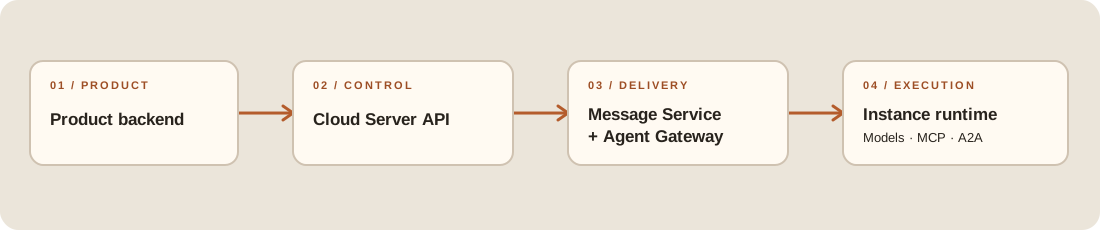 Open the diagram at full size
For live data, the backend authorizes a short-lived descriptor and the app connects to that descriptor's endpoint:
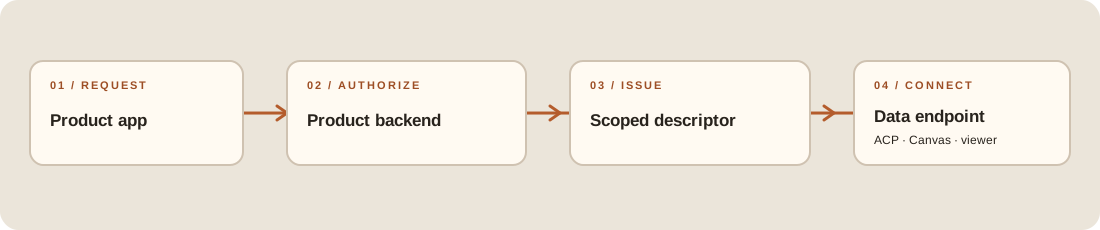 Open the diagram at full size
Resource lifecycle is a separate control-plane path through ClusterHub and a cluster proxy to the instance. Placement follows the connected provider, region, and cluster; the region catalog determines available choices.
| Boundary | Responsibility | Credential |
|---|---|---|
| Cloud API | Instances, agents, conversations, tasks, files, usage, runtime methods | Server bsk_ key |
| Agent Gateway | Runtime identity, file and canvas ports, A2A calls | Instance runtime token |
| Product backend | Product-user authentication and authorization, business commands through the Server SDK, and client-session or descriptor issuance | Product session and backend-only server key |
| Product frontend | Product-owned event channel and direct connection to authorized data endpoints | Product session or short-lived, purpose-scoped descriptor |
The product backend sends business CRUD and commands through the Server SDK, then publishes product-facing events on its own user real-time channel. A descriptor authorizes one data connection; it is not a general command channel or a substitute for the product's event stream. See product frontend integration.
The backend Cloud Server OpenAPI contract declares https://api.cloud.beeos.ai/v1; use the API URL issued for your environment when configuring a client.
Continue with SDK selection, authentication, or the quickstart.